Voice-over, subtitles, footage and music are all generated for you. Exports vertical and horizontal, with an SRT file and a cover image. Don't like one shot? Swap just that shot — the rest stays untouched.
Start free — first 3 videos on usEvery clip below came out of this tool. Nothing was re-cut, nothing was cherry-picked — the exact input is printed under each one.
It writes the script, picks the keywords and matches the footage. For daily posting when you need volume.
Pulls the article text and rewrites it as a spoken script. Good for news recaps, explainers and book summaries.
Pulls out the key points, and numbers in the document become actual charts instead of an unrelated stock photo.
The AI doesn't change a single word. It only adds the visuals, the voice-over and the subtitles. Your tone, your jokes, your terminology — kept exactly.
People use it for:
Long scripts are fine — it splits them into sentences and gives each one its own shot, so a three-to-five minute video works the same way a 30-second one does.
Upload a voice recording. It transcribes it into subtitles and matches footage to how long each sentence actually takes — the picture follows what you're saying. Your original audio is kept; no AI voice is layered over it.
People use it for:
This is the one faceless creators reach for most: no camera, no editing, and the subtitles land on the right frame by themselves.
Upload a song and you get a music video. Drop in an MP3 or WAV of a single track — it picks up the lyrics, turns them into subtitles, and matches visuals to what each line is about. Intros and instrumental breaks with no lyrics get split into their own shots, so the picture never sits frozen on a loop. Your original track is kept intact.
Plenty of tools just translate the buttons. Here the interface, the script language and the voice all line up: give it a Japanese topic and you get a Japanese script, a Japanese voice, and subtitles rendered with Japanese glyphs.
| What you type in | Script | Voice-over | Subtitle glyphs |
|---|---|---|---|
| English | English | US / UK / AU voices (12) | Latin |
| 日本語 | 日本語 | Japanese voices (2) | Noto Sans CJK JP |
| 中文 | 中文 | Chinese voices (8) | Noto Sans CJK SC |
If the voice you picked can't actually read the script's language, it switches to one that can — so you never end up with an English voice trying to pronounce Japanese.
Pick a shot, choose a different clip from the library, and every other shot stays exactly as it was — no reshuffling the whole video. Below is a real before/after from the same job.
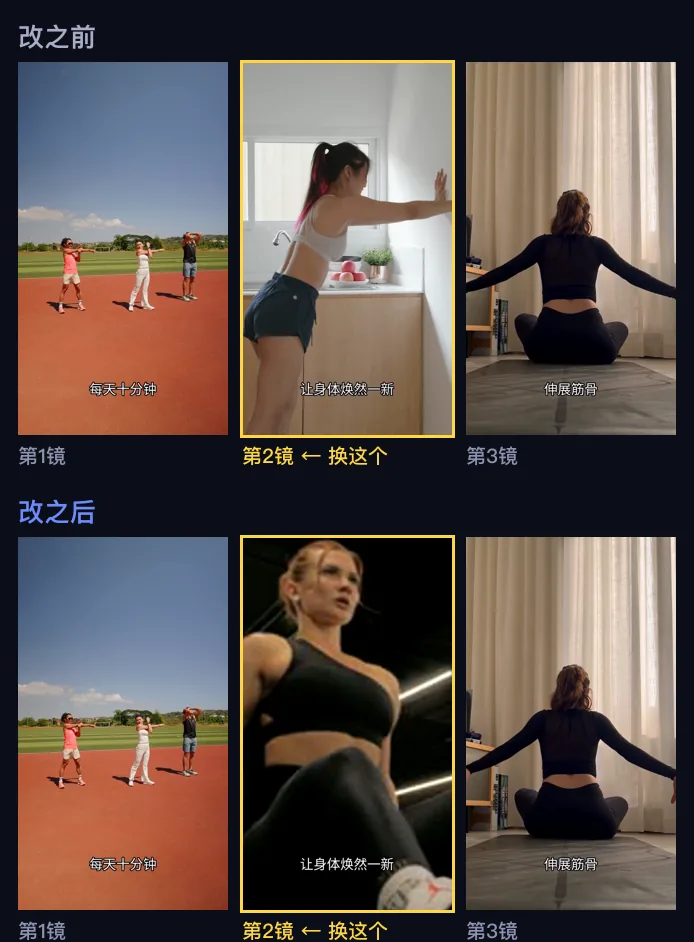
Tap the image for full size
Pixel-by-pixel difference: shot 1 0.0, shot 3 2.4 (video encoding noise). Only the shot that was targeted — shot 2 — actually changed.
You get a thumbnail of the clip currently used in each shot.
Pick a replacement from the categorised library.
Only that shot changes. Voice-over, subtitles and every other shot stay identical.
22 voices across English, Japanese and Chinese — preview before you pick.
Size, colour and position are adjustable, or turn them off entirely.
Searched against the meaning of each sentence, not dropped into a template.
Chosen to fit the mood of the content, or set the genre yourself.
Download separately and upload it wherever the platform wants its own captions.
Pulled from the video, ready to use as the thumbnail.
Vertical 9:16 for Reels, TikTok and Shorts; horizontal 16:9 for YouTube and LinkedIn. You can export both in one go.
The visuals are real, properly licensed stock footage. They are not generated frame by frame. So:
✅ Great for: explainers, listicles, news recaps, faceless channels, documents turned into video, lecture and course content, three-to-five minute long-form
❌ Not for: specific fictional scenes, consistent characters, cinematic camera work
Usually under a minute for a short video. Longer scripts take longer — it scales with the number of shots.
The interface comes in English, Japanese, Simplified and Traditional Chinese. The script language follows your content, and the voice and subtitle glyphs line up with it.
No. Choose "My script" and not a single word changes — it only adds the visuals, the voice-over and the subtitles.
Yes. Upload a recording and your original audio is kept in full — no AI voice is layered over it, and subtitles are timed to each sentence automatically.
Yes. Upload an MP3 or WAV of a single track — it picks up the lyrics, turns them into subtitles and matches visuals to them. Intros and instrumental breaks get their own shots.
No. It's real, properly licensed stock footage, searched against the meaning of each sentence.
Replace just that shot. Every other shot, the voice-over and the subtitles stay exactly as they were — no need to redo the video.
MP4 in vertical 9:16 and horizontal 16:9, plus an SRT subtitle file and a cover image — ready to post to Reels, TikTok, YouTube Shorts and the rest.
Don't like a shot in the result? Swap it on its own, no need to redo the video.
 OneClick Studio